

| Key Links |
| - Accessibility - Pricing - Free Trial - Order Form - Downloads - My Account - Contact Us - FAQ |
 |
| Data Packages |
| - Stocks - Futures - Forex - Data Content Tables - FAQ |
|
| Norgate Data Updater |
| - Overview - Installation - Usage - Watchlist Library - Tools - FAQ |
|
| AmiBroker Plugin |
| - Overview - Plugin Installation - Database Creation - Database Layout and Content - Usage - Known Issues - FAQ |
|
| Python Package |
| - Installation & Usage |
|
| Zipline Package |
| - Installation & Usage |
|
| RightEdge Plugin |
| - Overview - Plugin Installation - Plugin Configuration - Usage - FAQ |
|
| Wealth-Lab Extension |
| - Overview - Extension Installation > Extension Configuration - Usage - FAQ |
|
| Notes |
| - Refunds Policy - Privacy Policy - Licence Agreement - NDU Change Log - System Requirements - Alternative Market Glossary |
|
Wealth-Lab 8 Extension Configuration Guide
The following instructions are for Wealth-Lab 8. To view the instructions for Wealth-Lab 6.9 go here.
Changing the "Date Padding" and "Price & Volume Adjustment"
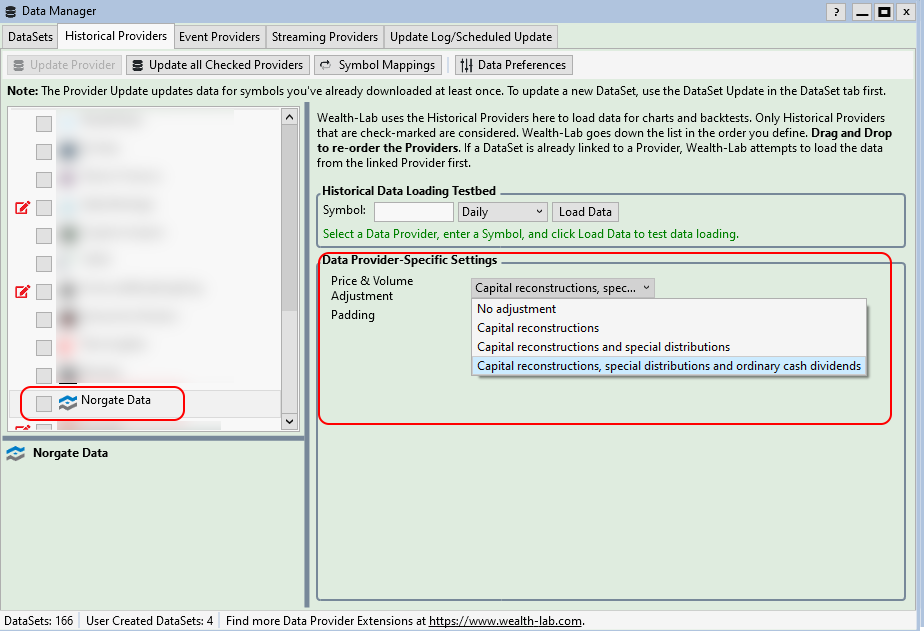
These settings can be changed at any time by clicking the Data Manager button in Wealth-Lab then selecting the Norgate Data in the "Details" tab, then clicking the "Historical Providers" tab (tick this if unticked)
To change Price & Adjustment settings, click "Price & Volume Adjustment":
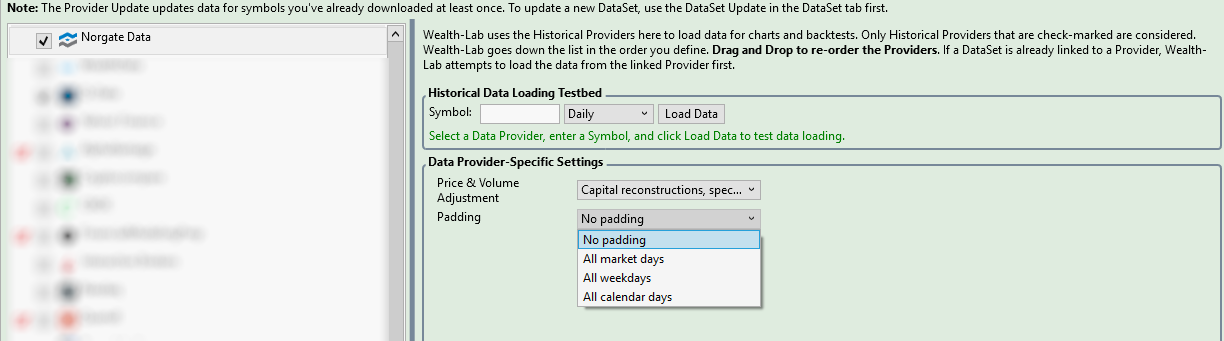
To change the Padding options, click "Padding"
Referencing the Norgate Data Extension in your trading systems
To access extended information available from the Norgate Data extension (such as metadata) add the line:
using WealthLab.Norgate;to your strategy code.
Next page: Wealth-Lab Extension Usage